
Chat commands
A chat command is saved text that Kalandra types into the game chat when you press its hotkey. Use it for game commands such as /hideout, or for messages that you send often.
Set up commands
Open the Settings window and go to Chat. Each command has these fields:
- The text field holds the text to type, such as
/hideout. press Entersends the text when it is on, which is the default. When it is off, Kalandra pastes the text into the chat box and leaves the box open, so you can add to the text and pressEnteryourself.Removedeletes the command.- The hotkey field shows
Not Setuntil you press a key or key combination in it.Backspaceclears it.
Add command adds an empty command at the end of the list. Click Save to apply your changes. Hotkeys work only while the game window is active, and they follow the other rules in Settings.
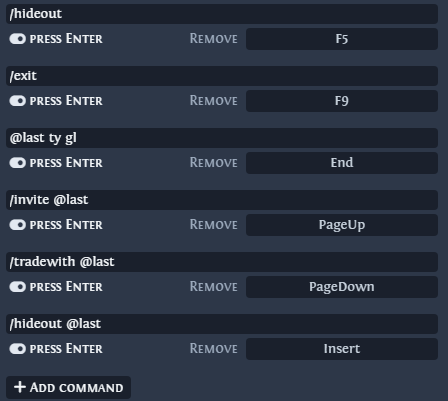
In this screenshot, the text of the third command and the last four hotkeys differ from the defaults in the next table.
Default commands
| Text | Hotkey | What it does in the game |
|---|---|---|
/hideout | F5 | Takes you to your hideout. |
/exit | F9 | Exits to the character selection screen. |
@last ty | Not Set | Whispers ty to the character you last whispered with. |
/invite @last | Not Set | Invites that character to your party. |
/tradewith @last | Not Set | Sends that character a trade request. |
/hideout @last | Not Set | Takes you to that character's hideout. |
The chat page of the Path of Exile 2 wiki describes the game chat and its commands.
How Kalandra types a command
- Kalandra puts the text on the clipboard.
- It presses
Enterto open the chat box. When the text does not start with#,%,@,$,&or/, it then pressesCtrl + A, so the command replaces any text already in the box. - It pastes the text with
Ctrl + V. - When
press Enteris on, it pressesEnterto send the text. It then pressesEnter,ArrowUptwice andEscape.
Text that starts or ends with @last uses other keys, which the next section describes.
On macOS, Kalandra presses Cmd in place of Ctrl. After a command, the clipboard holds the command text, also with Restore clipboard on in Settings, General. Kalandra cannot see when the game pastes. A game that stalls, for example while it loads an area, would paste text put back before then in place of the command, and the Enter of step 4 would send it to chat.
Kalandra skips a chat command or a stash search that comes less than 120 ms after the previous one. This limits how fast it sends actions to the game, which disconnects a player who sends too many.
The @last placeholder
@last stands for the name of the character you last whispered with, or who last whispered you. Kalandra handles it only at the start or at the end of the text.
Text that starts with @last is sent as a whisper to that character. Kalandra presses Ctrl + Enter, which opens the chat box with a whisper to that character, and pastes the rest of the text after it.
Last whisper received: @From UltraSkillPlayer: Thank you.
Command: @last Good luck!
Sent text: @UltraSkillPlayer Good luck!
In text that ends with @last, Kalandra puts the character's name in place of @last. It presses Ctrl + Enter, deletes the @ in front of the name, and pastes the text before @last in front of the name.
Last whisper received: @From UltraSkillPlayer: Can I visit your Toucan hideout?
Command: /invite @last
Sent text: /invite UltraSkillPlayer
@last anywhere else in the text is sent as written.
FAQ
How do I see the text that Kalandra sent?
Open the chat with Enter and press ArrowUp twice. To see what Kalandra does when you press a hotkey, check Record all key presses on the Debug page of the Settings window. The page then lists each key press and the action of each hotkey.
How do I leave a party?
Add the command /kick <your character name>. Change the name when you play another character.
Can one hotkey send several commands?
No. Grinding Gear Games, the maker of Path of Exile 2, allows one server action per key press, so each hotkey sends one command.