
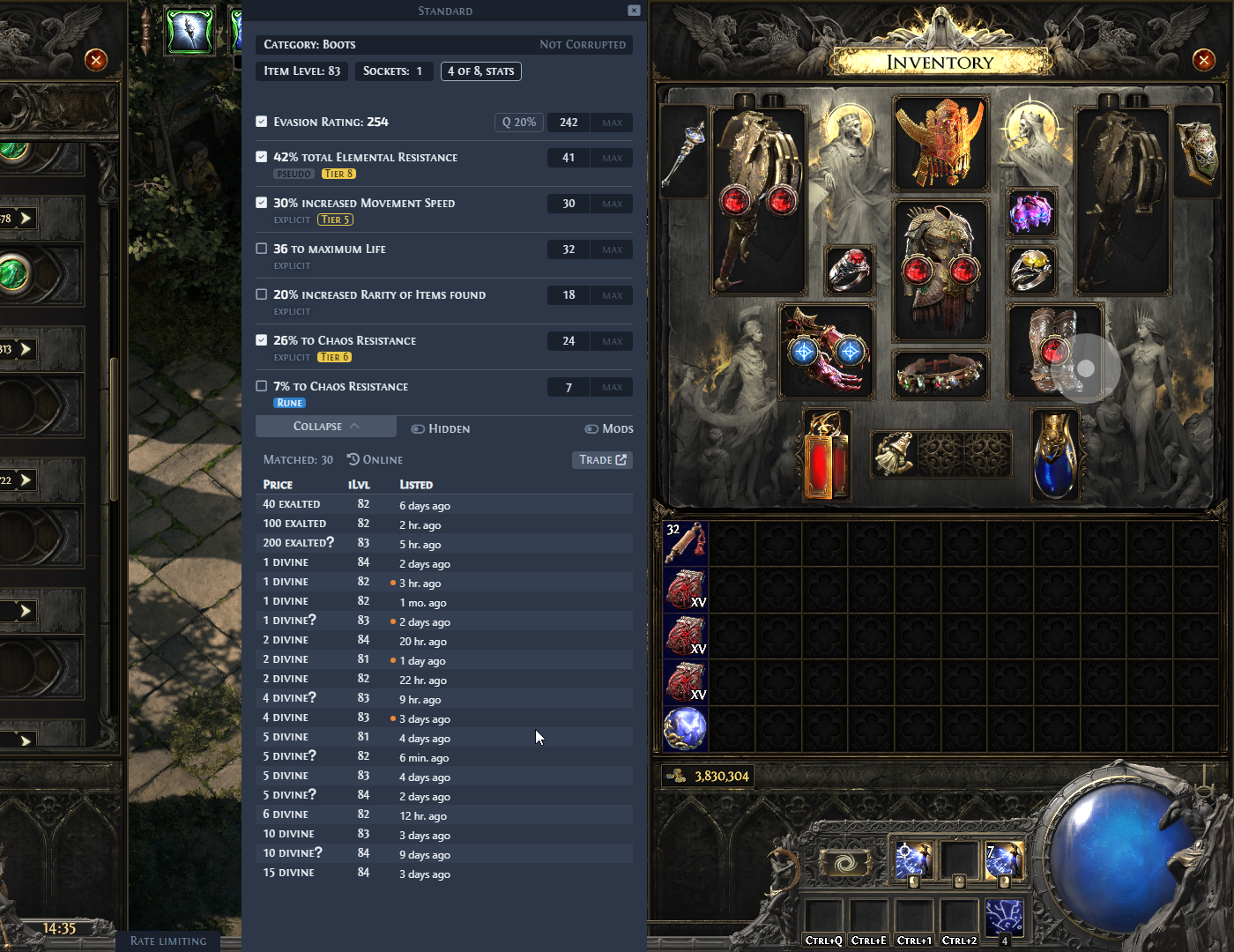
Kalandra is an overlay for Path of Exile 2: an app that shows its own windows on top of the game. Hover an item in the game and press Ctrl + D: Kalandra builds a search for the official trade site from the item's stats and lists the matching items with their prices. Its widgets also check waystone mods, search your stash, track experience and more.
Kalandra continues Exiled Exchange 2 by Kvan7, which is a fork of Awakened PoE Trade by SnosMe.
Highlights
- Suggested price: a price check suggests a price, a range and how reliable they are for any item, rares included, from the listings it already got. On by default.
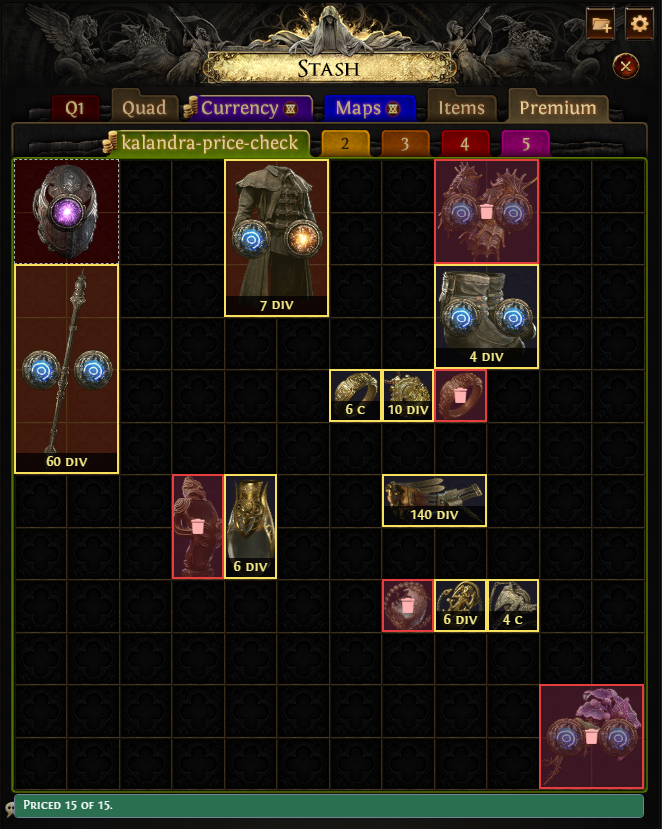
- Stash prices: put your loot into one public stash tab, and Kalandra prices every item in it in the background and marks each one over the stash with its price, or as trash, when you open the tab in the game.
Start here
- Download: install Kalandra.
- Quick start: the default hotkeys and your first price check.
- Features: what else Kalandra does.
- FAQ and Common issues: what to try when something does not work.
Download Kalandra only from the Download page or the GitHub releases. To report a bug or ask a question, open an issue on GitHub.
All pages
Get started
- Download: the download links, the game settings Kalandra needs, and how to move your settings from Exiled Exchange 2 or Awakened PoE Trade.
- Quick start: the terms these pages use, how Kalandra reads an item, the default hotkeys and how to read the price check window.
- Features: one short section per feature, each with a link to its page.
Price check
- Price check: the price check window, its filters and trade search, and where its price estimates come from.
- Suggested price: an experimental price, range and reliability worked out from the trade listings of a price check.
- Item info: a summary of an item, such as weapon DPS, with buttons that open it on the wiki, PoEDB or Craft of Exile.
- Map check: marks the waystone mods you set as dangerous, warning or good.
- Private leagues: price checking in a private league through the built-in browser.
Widgets
- Widgets: the main button bar of the overlay, and how to move, edit, hide and delete widgets.
- Stash search: saved search texts that Kalandra types into the game's search box.
- Stash prices: reads a public stash tab of yours in the background, prices its items without a price, and marks them over the stash in the game.
- XP tracker: a widget that shows your level, your experience multiplier in the current area and how far you are from the level penalty.
- Extra widgets: the Image strip, Stopwatch, Notepad and Item search widgets.
- Chat commands: send a chat command, such as
/hideout, with one key. - Item data: an experimental widget that records crafting results to a CSV file.
- Client log file: the format of
client-log.ndjson, the file in which Kalandra stores the entries it reads from the game's log file.
Settings
- Settings: every page of the Settings window, such as Hotkeys, General and Debug, and the tray menu.
- Command-line options: options that change how Kalandra starts, such as
--no-overlay.
Problems
- Common issues: steps to try, in order, when Kalandra does not work.
- FAQ: short answers, such as where to find the settings and the logs.
- Nothing happens: what to do when the price check hotkey opens nothing.
- No stats to select: what to do when the price check window shows no mods.
- Query is too complex: what to do when the trade site rejects a search as too complex.
- Failed to load leagues: what to do when Kalandra cannot load the league list.
- Invalid JSON: what the error about a web page instead of data, which older versions call invalid JSON, means and what to check before reporting it.