
Item info
Item info is a small window with buttons that open the item on other sites or search for it in your stash. For a weapon it also shows the damage per second (DPS).
Open it
Set a key in Settings, Hotkeys page, Map check / Item info. It has no key by default. Point at an item and press the key: the window opens next to the game's panel on the side of the item, and it closes when you return to the game.
For a Waystone that is not unique and for an Expedition Logbook, the same key opens Map check instead.
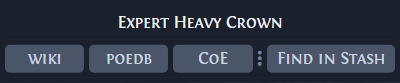
Buttons
The top line shows the item's base type, or the unique's name for a unique. The buttons under it are:
| Button | What it does |
|---|---|
| wiki | Opens the poe2wiki.net page of the item's base type, or of the unique, by its English name, in your default browser. |
| poedb | Opens poe2db.tw in the app's language. A unique opens its own page. Another item opens the modifier calculator for its kind, for example Helmets_str_int for a helmet with armour and energy shield, or Life_Flasks for a life flask. A tablet opens the calculator on its own page, such as Temple_Tablet. An item kind with no calculator page opens the item's own page, and so does an item whose kind the game data does not know yet. |
| CoE | Opens Craft of Exile with the full item text imported. It shows only when the app language is English, and only for an item you can still modify: not corrupted, mirrored or sanctified. Kalandra has not checked an import of item text in another language. |
| Find in Stash | Switches to the game and types the item's name, in quotes, into the stash search, as Stash search describes. The name is the base type for a normal, magic or rare item, and the unique's name for a unique. |
| dollar sign | Shows only when the item has a price note, the Note: line in its text. It searches the stash for the same note in quotes. |
With Filter by set to Price and Item, the dollar sign button also adds the item's name to the stash search, when the note and the name together, with their quotes, are at most 50 characters.
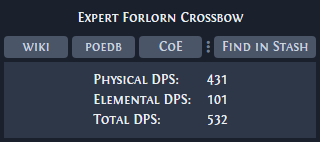
Weapon DPS
For a weapon the window also shows Physical DPS:, Elemental DPS: and Total DPS:. Each one is the weapon's attacks per second times its average damage of that type. Total DPS: is physical plus elemental, and chaos damage is not counted.
Settings
Settings, Item info page, gives each button its own key. A key runs the button's action on the item under your cursor without opening the window. No key is set by default, and an unset key shows Not Set. Changes apply when you click Save.
| Setting | Default | What it does |
|---|---|---|
| Open item on wiki | Not Set | Runs wiki. |
| Open item on PoEDB | Not Set | Runs poedb. |
| Open base item on Craft of Exile | Not Set | Runs CoE. This row shows, and the key works, only when the app language is English. |
| Find in Stash | Not Set | Runs Find in Stash. |
| Filter by | Price and Item, Not Set | The list sets what the dollar sign button searches for: Price Only or Price and Item. The key runs that search. |
The key that opens the window is on the Hotkeys page. See Settings.