
Invalid JSON
A price check can fail with an error box titled Trade site request failed that shows this line:
Error: The trade site sent a web page instead of data (status 503). It can be down, under maintenance or showing a bot check.
The number is the HTTP status that the trade site answered with, such as 403 or 503. The error can appear on an item search and on a bulk search, such as a currency price check. Older versions of Kalandra show the line Error: Unexpected token '<', "<!DOCTYPE "... is not valid JSON for the same cause:
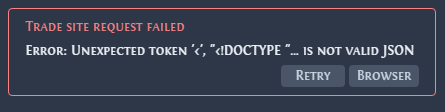
JSON is the data format of the trade site's responses. Both errors mean that the trade site sent a web page where Kalandra expected JSON. A web page starts with <!DOCTYPE, and its first character < is the unexpected token of the older message. The trade site sends a web page when it is down or under maintenance, or when it shows a bot check: a page that tells people from automated programs.
Fix it
- Open the trade site in your normal browser. If it does not load, wait until it is back, then click Retry.
- If the trade site works, click Browser in the error box. It opens the same search on the trade site in the built-in browser. Complete any check the page shows.
- Click Retry. A check passed in the built-in browser also applies to Kalandra's own trade requests.
Failed to load leagues describes the same bot check when it blocks the list of leagues.
If the error stays while the trade site works in your browser, open an issue with the full error text and the lines from the Debug settings page (Where can I find the logs?).